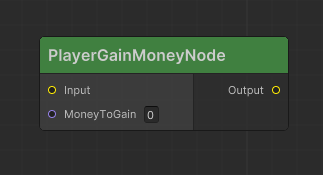
a tool for store dialogues into Unity's ScriptableObject, and visualize it on Unity's GraphView, make them easier to read and edit, allow user to create custom Node and Port by script
Installation
- In UnityEditor, open PackageManager Window > Package Manager
- Click a plus sign button on the most top-left, then select add package from git URL
- enter TextField with this git URL, then press add button
Create Custom Node
First create class that Extends BaseNode and Defined [CreateCustomNode()]
Failed to fetch :(
GistUrl : https://gist.githubusercontent.com/basdidon/58f858dca0bb4bf1da3b7b1ddd1829c4/raw/3fb29acc6db52c7e2c59bf9123911dc0b7fae322/Flowgraph_example_01.cs
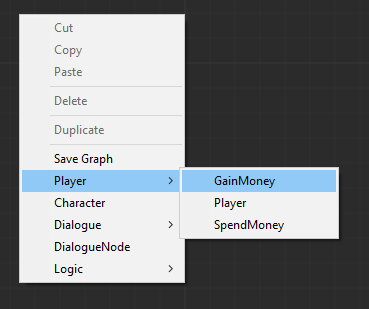
OpenNow you can create node by open graphTree and right-click on empty space, then selectPlayer > GainMoney
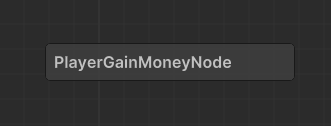
And a node will look like the image below because we have not defined the port yet.
Next, let create port Input port with type ExecutionFlow by declare Getter name it as "Input" and define Attrbute [Input] to tell FlowGraph this is a input port.
Declare another port with same type but name it as "Output" and define Attrbute [Output] to tell FlowGraph this is a output port.
Failed to fetch :(
GistUrl : https://gist.githubusercontent.com/basdidon/58f858dca0bb4bf1da3b7b1ddd1829c4/raw/3fb29acc6db52c7e2c59bf9123911dc0b7fae322/Flowgraph_example_02.cs
OpenNow if you go back to GraphTree, Graph will re-render and node will be added by ports, like below.
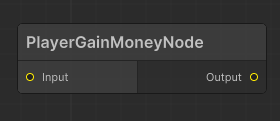
You can plug it into another port with same type, but not on the same node, and not on the same direction.
Next step, Create port with type int name it as MoneyToGain like following code.
Failed to fetch :(
GistUrl : https://gist.githubusercontent.com/basdidon/58f858dca0bb4bf1da3b7b1ddd1829c4/raw/3fb29acc6db52c7e2c59bf9123911dc0b7fae322/Flowgraph_example_03.cs
Open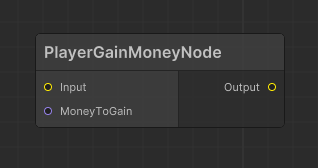
Node that have a ExecutionFlow port, won't be performed until Node implements IExecutableNode
- OnEnter() : Method called when a controller entering the node.
- OnExit() : Method called when a controller exiting the node.
- Action() : Method for executing an action on the node.
So we need to implements IExecutableNode . And when OnEnter() we increase Player's Money and Move To Next Node.
Failed to fetch :(
GistUrl : https://gist.githubusercontent.com/basdidon/58f858dca0bb4bf1da3b7b1ddd1829c4/raw/3fb29acc6db52c7e2c59bf9123911dc0b7fae322/Flowgraph_example_04.cs
Open We can't read a value from MoneyToGain because we never set a value to it. Let's imagine that when we read data from this port, we need to find the port that connects to it. Then we read data from that port and return it. Otherwise, if it doesn't connect to any other port, it should return the default value. But don't worry, we have the methodGetInputValue(portName,defaultValue)to do that for us. So we just apply this method to our code.
Failed to fetch :(
GistUrl : https://gist.githubusercontent.com/basdidon/58f858dca0bb4bf1da3b7b1ddd1829c4/raw/3fb29acc6db52c7e2c59bf9123911dc0b7fae322/Flowgraph_example_05.cs
Open we can create backingField by declaring a field with the same type of port. And add name of that field to [Input] or [Output] , After that we need to set backingField's value to default port value by replace default value inGetInputValue(portName,defaultValue)
Failed to fetch :(
GistUrl : https://gist.githubusercontent.com/basdidon/58f858dca0bb4bf1da3b7b1ddd1829c4/raw/3fb29acc6db52c7e2c59bf9123911dc0b7fae322/Flowgraph_example_06.cs
Open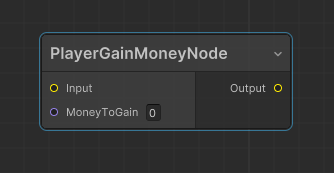
Finally, You can changed background color and text color of the header. by create new class extend NodeView and define [CustomNodeView] and override both color like following code.
Failed to fetch :(
GistUrl : https://gist.githubusercontent.com/basdidon/58f858dca0bb4bf1da3b7b1ddd1829c4/raw/3fb29acc6db52c7e2c59bf9123911dc0b7fae322/Flowgraph_example_07_styling.cs
Open